

Ausmed is a Trusted Information Partner of Healthdirect Australia. Verify here.


© 2026 Ausmed Pty Ltd (ABN: 33 107 354 441)
For aged care providers who need to show they review every worker regularly, at every home. Ausmed Perform™ issues appraisals, probation reviews and supervision meetings on schedule, and keeps what you discussed and agreed against the worker's record.
A clinical manager checks in with a new care worker after a hard shift. A facility manager runs probation reviews at week three and month six. Both are supervision and review, and most homes keep them on paper, in a diary, or not at all.

Appraisal forms and catch-up notes sit in a manager's drawer at each home, and nobody can count them.
In Ausmed Perform™ managers complete each review against the worker, and Ausmed reports completion by team, location, job role and manager.

The review waits for a manager's free afternoon, which doesn't come on a short-staffed roster.
A review program issues each review when it falls due and reminds the people involved.

The six-month mark passes while everyone is covering shifts, and a poor fit becomes permanent.
A once-only probation program opens each checkpoint at the point you set, such as week three, week eight and month six.

A year of good handovers and small concerns comes down to what the manager recalls the week before.
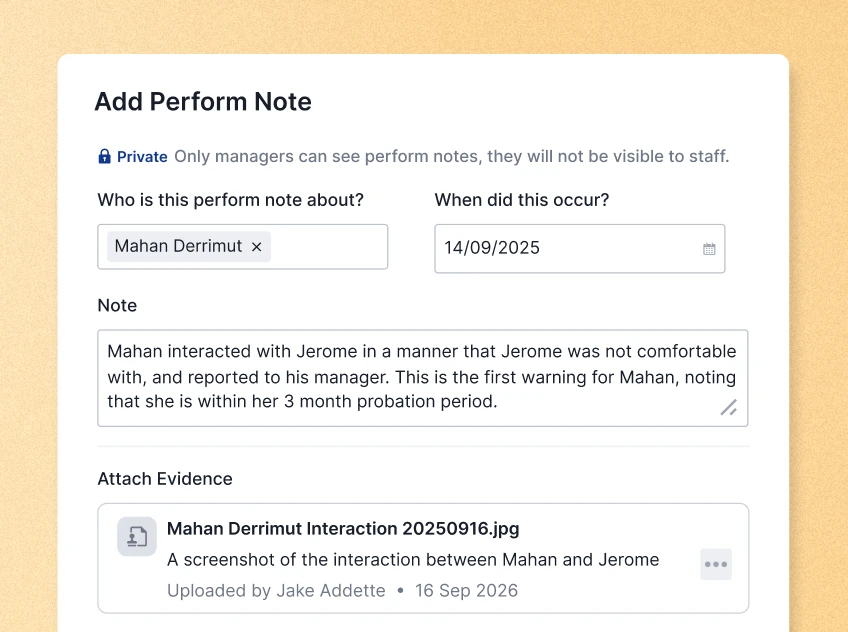
Perform Notes let managers record things as they happen, and they write the review from twelve months of notes.

One facility manager runs monthly catch-ups, another runs none.
Organisation-wide templates and a shared question bank give every home the same review, and reports show which managers are behind.

An action comes out of a catch-up and nothing records it.
Managers set and track the goals agreed in a review against the worker, and the meeting history means the next conversation starts where the last one ended.
Ausmed Perform™ issues probation and appraisal reviews on schedule and records one-on-one meetings, so what you discussed and agreed stays on the worker's record.
See it with your own cyclesReviews at set points through probation, so the decision at the end rests on what you recorded along the way.
Track annual, twice-yearly or quarterly review cycles for every worker at every home.
Record regular one-on-ones as meetings, with what you discussed and what you agreed.
Managers and colleagues give feedback and tag it to the standard it relates to.
Workers rate themselves before a review, so the conversation starts where they and their manager see things differently.
Record a note against the worker and assign a reflective activity to the people involved.
Set up a program once: annual, twice-yearly or quarterly reviews, or a once-only program for probation and induction.
Build the forms from organisation-wide templates and a question bank of clinical and organisation-specific questions. Ausmed Perform™ then issues each review on time and reminds the people involved.
Managers see what is due and overdue in one place, and reports filter by team, location, job role and manager.
Discover Ausmed Perform™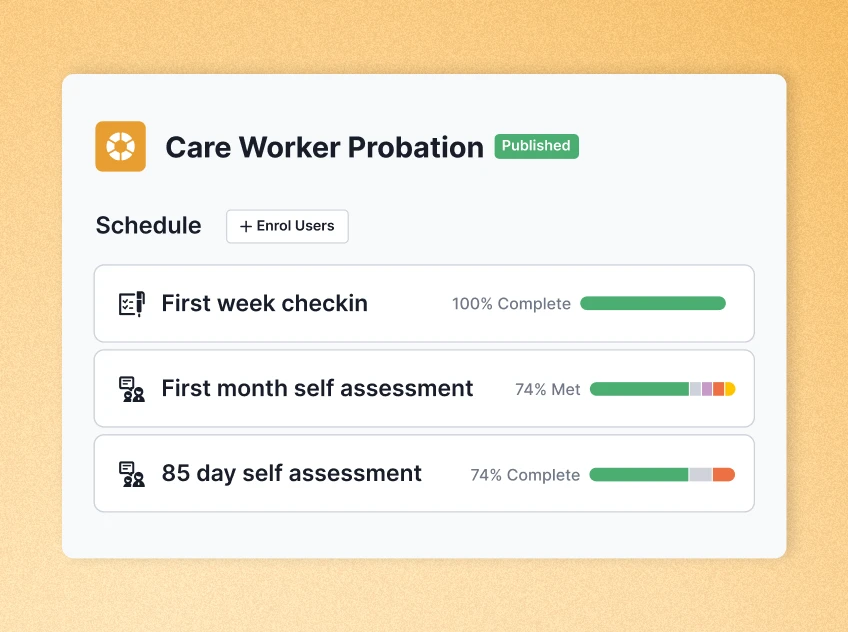
Record one-on-one and team meetings in Ausmed Perform™. The meeting history builds up on the worker's record, so the next meeting starts from where the last one finished.
Between meetings, managers add Perform Notes as things happen: a handover done well, a concern worth watching. Notes are a manager-only record. By the time the annual review comes round, the manager has twelve months of notes to write it from.
Ausmed can load a new worker into induction and probation programs when they start, alongside their training plan in Ausmed Learn™. Their probation checkpoints, the feedback gathered along the way and their first annual review all sit in one place.
Set and track the goals agreed in a review against the worker, so the next review picks up where the last one finished.
Learning management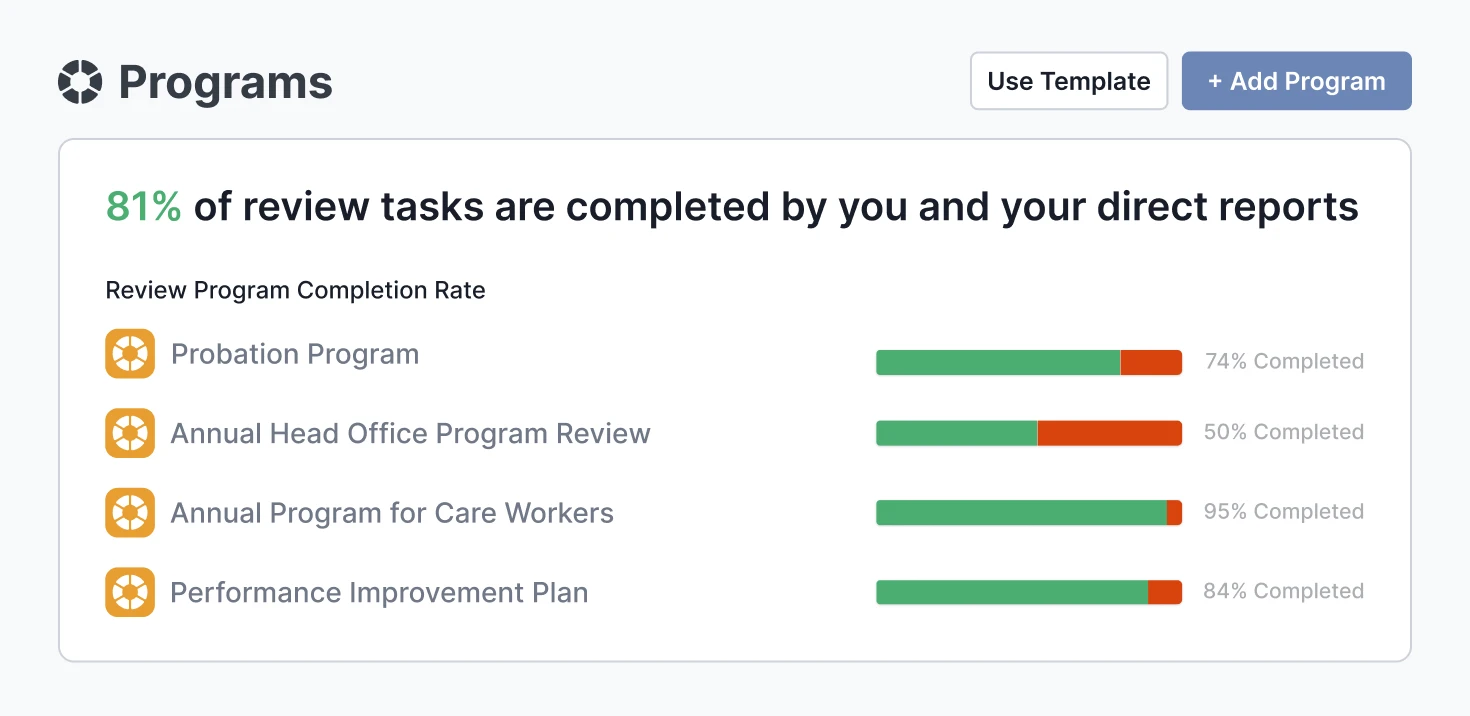
Review and probation programs, meetings, feedback and notes, on the cycles you set.
Ausmed Perform™The training record a review draws on, and the training you assign when a review finds a gap.
Ausmed Learn™Practical assessments for the skills a review flags, with the result on the worker's record.
Ausmed Competency™Dana Unicomb, Quality and Capability Coordinator, Cooinda
An auditor checking Action 2.9.7 looks for dates. Each review program issues reviews on schedule and keeps the completed review against the worker, at every home, so "regular" is something the record shows.
The provider undertakes regular assessment, monitoring and review of the performance of aged care workers.
“Aged care workers have access to appropriate supervision, escalation, support and resources.”
Supervision meetings you record in Ausmed Perform™, with their history, show that access worker by worker.
Training that is “responsive to feedback, complaints, incidents, identified risks and the outcomes of regular aged care worker performance reviews”.
When a review finds a gap, assign training in Ausmed Learn™ or a practical assessment in Ausmed Competency™. The review and the response sit on the same worker’s record, both dated.
Bring the appraisal form you use today, and we'll set it up as a program across every home with you.
If your HRIS runs reviews well and your managers use it, keep it.
Perform suits providers who want reviews in the same platform as training and competency. Its question bank includes clinical questions, managers can tag feedback to the Standards, and Perform tracks goals next to the worker's training record.
Supervision runs on Perform's meetings, notes and programs. There is no separate supervision module. Most providers set up a recurring program for supervision meetings and a separate cycle for formal reviews, with the annual review drawing on the year's notes.
Perform Notes are a manager-only record, and the worker never sees them. The worker, their manager and administrators with the relevant permission can see meetings and self-assessments.
Yes. In their own portal, workers see the review programs they are enrolled in, their self-reflection history, their meeting history and the feedback they have received.
Ausmed is a Trusted Information Partner of Healthdirect Australia. Verify here.